

1xBet Error Codes
No official list exists, so here is what South African players actually see: HTTP codes, Cloudflare codes and account messages, with a fix for each.
Your 1xBet Error Code, Decoded
A 1xBet error code is almost always a standard web code (403, 503, 522) or an account notice, not a secret brand number. Check the status below, test another network, then match your message in the table.
Checked 06 Oct 2026. Meanings come from web standards and Cloudflare documentation; our own address checks are shown live below.
One thing first: 1xBet does not publish a catalogue of its own errors. When you search for "1xbet error", you land on a mix of browser messages, security-check pages and short notices such as "bet not accepted" or "verification required". This page sorts them by where they come from, because the place a message comes from tells you who can fix it.
Current Status of the 1xBet Addresses
Live Status
Our server requests these 1xBet addresses at most once every 10 minutes and shows the last answer. Last check: 12 Oct 2026, 11:52 UTC.
Change Log
- 1xbet.com: watching started, redirects to a block page (HTTP 302)
- 1xbet.co.za: watching started, not responding (HTTP 403)
The log keeps every switch between "responding" and "not responding", newest first; the first line for each address is when we started watching it. A green light only means the server answered from our location, not that login, games or payments work for you.
Each row shows the last answer our server received, with the HTTP code and response time. "Responding" means a normal answer (200 range) or an ordinary redirect; a redirect to a block page is shown in red as "redirects to a block page". A security check page is returned to our script as a 403, so a row can read "not responding" while a real browser may still pass the check and load the page. When we looked on 06 Oct 2026, 1xbet.co.za returned a 403 challenge page and 1xbet.com redirected our server to a block page. Treat that as one data point from one location, not a verdict on your connection.
The change log underneath lists each moment the answer flipped between up and down, so you can see whether an outage is brand new or has been going on for hours. If both rows have been red for a long time and you have already tried another network, waiting is usually the only fix. Our about page explains how this site checks things.
Is It Your Device, Your Network or the Site?
- 1
Try another site
Open any big news site. If that also fails, the fault is your connection. Restart the router or switch between Wi-Fi and mobile data.
- 2
Try another device
Open 1xBet on a second phone or laptop on the same network. Works there? Your first device is the problem, usually cache or an old app.
- 3
Try a private window
A private or incognito tab skips cookies and extensions. If it loads, clear site data in your normal browser and switch off ad blockers for the page.
- 4
Read the status widget
Same failure everywhere and both rows red? It is most likely the site or a network between you and it. Wait 15 minutes and try again.
Only when all four steps fail the same way is it worth contacting live chat. Mention which steps you tried, because it saves a round of generic questions. If the trouble is only the sign-in form, jump to the login help page rather than repeating these steps.
What Happens to Your Bet When an Error Hits Mid-Round
The scary case is an error that appears after you have already placed a stake. On most online casino and betting platforms the result is calculated on the provider's server, not on your phone. Closing the tab, losing signal or seeing a white screen does not normally cancel the round: it usually carries on and is settled whether you watch it or not.
So the first move is not to place the bet again. Sign back in and open your bet history or game history. If the round is listed, it was accepted and the outcome will be shown there. If it is not listed, the stake normally never left your balance. Check your balance as well, since a double stake is the one thing you want to avoid.
Keep any round ID, ticket number or transaction reference you can see, and note the time. If something looks wrong, that detail is what live chat needs to look at your case. For live-dealer tables and wheels such as Crazy Time, the studio keeps its own round record, which is why the ID matters.
Do not retry in a hurry
Pressing "bet" three times on a frozen screen is how duplicate stakes happen. Wait for the page to settle, then check history.
Fixes by Symptom
Page will not load
Check the status widget, then test a second network. Close extra tabs, clear the cache for the site and reload. A long blank screen followed by 522 or 524 points to the site side.
Security check loops
"Just a moment" that never finishes usually means blocked cookies or scripts. Allow cookies for the page, turn off strict content blockers, update the browser and try once more.
Payment page error
Declined deposits trace back to limits, a name mismatch, a bank that blocks gambling merchants or an unfinished verification. Note the reference and ask live chat before a second attempt.
Game will not launch
Try a different game first. If only one fails, the provider may be having trouble. Reload, switch browsers, and see our Crazy Time guide for live-game tips.
App or APK will not install
The Android app comes as an APK from the mobile site; there is no 1xBet iOS app in the South African App Store. Allow installs from your browser, free some storage and re-download if the file is incomplete.
Bet not accepted
Odds may have moved, a market closed, the stake may be outside the allowed range or an active bonus may limit stakes. Refresh the slip and check the bonus rules.
Account notices such as "verification required" are not faults at all. They mean the operator wants documents or details before it lets a payment or withdrawal go ahead. Complete that step in your profile and the message normally disappears.
Error Codes Explained
These are the codes behind most "1xbet error" searches. Meanings are the standard ones, not 1xBet inventions.
| Code | Meaning | What to do |
|---|---|---|
| 403 | Access refused | Retry later |
| 404 | Page missing | Use menu |
| 429 | Too many requests | Slow down |
| 451 | Legal block | Ask support |
| 500 | Server fault | Wait |
| 502 | Bad gateway | Reload |
| 503 | Temporarily unavailable | Wait |
| 504 | Gateway timeout | Retry |
| 1020 | Firewall rule | Send Ray ID |
| 520 | Unknown error | Retry |
| 521 | Server down | Wait |
| 522 | Connection timed out | Wait |
| 523 | Server unreachable | Wait |
| 524 | Timeout occurred | Retry |
| 525 | SSL handshake failed | Check clock |
| 526 | Invalid certificate | Wait |
Swipe to see the full table
403, 1020 and 451: refused on purpose
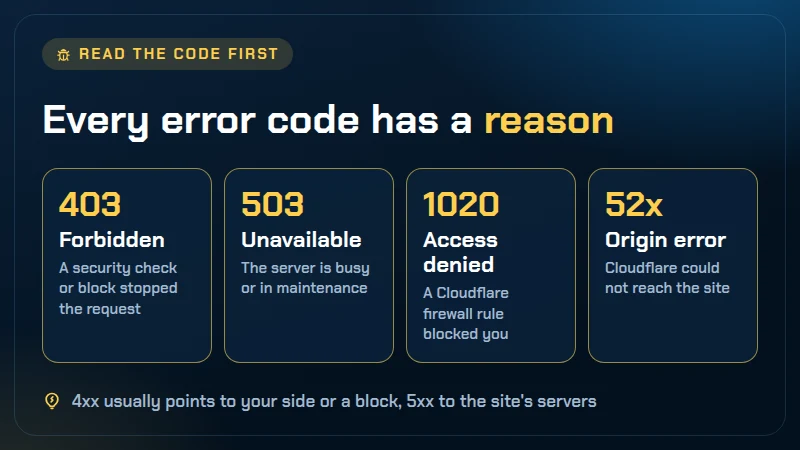
A 403 means the server understood the request and declined it, so typing your password again cannot help. Cloudflare 1020, "Access Denied", is the same idea with a clearer cause: a firewall rule set by the site owner matched your request. Neither is something you can repair from your side. Take a screenshot, note the Ray ID printed on the page and give both to live chat. A 451 is reserved for legal reasons; in our own check 1xBet used a redirect to a block page rather than a 451, so you are more likely to meet that block page than the number.
404 and 429: your request, not the server
A 404 is a dead link or an old bookmark. Go to the home page and use the menu. A 429 means you sent too many requests in a short time, often from repeated refreshing or a script. Stop for several minutes before trying again.
500, 502, 503, 504 and 520-526: the site side
These all say the problem sits between the server and the front door, not on your phone. 500 is a generic fault, 502 and 504 mean a gateway got a bad answer or none in time, and 503 means the service is busy or in maintenance. Cloudflare adds its own numbers: 520 unknown error, 521 server down, 522 and 524 timeouts, 523 server unreachable, 525 failed SSL handshake and 526 invalid certificate. Waiting is the honest fix. For 525, one thing you can check is the date and time on your device, since a wrong clock breaks secure connections.
If you simply cannot get into your account and none of these appear, our login help page is the better next stop.
1xBet Errors: Quick Answers
Does 1xBet have its own list of error codes?
We found no public list of 1xBet error codes, so be wary of any page that sells you a table of "1xBet error 1001" style numbers. What you see in practice are standard web codes such as 403 or 503, Cloudflare codes such as 1020 or 522, browser messages and plain-language notices inside your account.
Why do I get a 1xBet 403 error or "access denied"?
A 403 means the server understood your request and refused it. Logging in again changes nothing, because the refusal is about the request, not your password. It can come from a security check, a blocked connection or a firewall rule. Wait a few minutes, retry on a different network, and if it persists send live chat a screenshot with the Ray ID shown on the page.
Why is the 1xBet page not loading when other sites work?
Most often the site is slow or temporarily down, a security check is stuck, or a stale cache is getting in the way. Try the 60-second diagnosis above: another device, another network, a private window. If all of them fail the same way, check the status widget and wait rather than reinstalling anything.
My deposit was declined. What should I do?
Check the amount against the limits shown on the payment page, confirm the name on the payment method matches your account, and ask your bank whether it blocks gambling merchants. If the money left your bank but not your 1xBet balance, keep the transaction reference and open live chat. Your welcome bonus may depend on that first deposit, so sort it out before trying again.
I lost connection mid-round. Is my bet gone?
Not necessarily. On most platforms a round is settled on the server whether or not your screen stays open. Log back in, open your bet history and look for the round before placing anything new. If a live round such as Crazy Time is missing from history, contact live chat with the round ID and the approximate time.
When should I contact support instead of fixing it myself?
Contact live chat when the same message appears on two networks and two devices, when money has moved but your balance has not, or when an account message asks for verification. If the problem is only that you cannot sign in, the login help page covers it step by step.




Back in the game
Fixed it? Pick up where you left off
Most error screens clear within minutes once you know whether the fault is your device, your network or the site. When you are ready, head back to 1xBet and keep your round IDs handy.
18+ only. Gambling involves risk. Play responsibly. NRGP Help: 0800 006 008
Visit 1xBet